< Excel VBA基本觀念測驗(二) >
免費免註冊,彰化一整天線上測驗:http://exam.bestdaylong.com/test2188.htm
| ( | ) | 1. | 在Excel VBA的即時視窗輸入 print 1 & 2 & 3 請問會顯示(1)1+2+3 (2)6 (3)123 (4)0 | ||
| ( | ) | 2. | 在ExcelVBA中要將3顯示在即時視窗要如何使用(1)debug.print 3 (2)echo 3 (3)debug.echo 3 (4)print 3 | ||
| ( | ) | 3. | 在Excel VBA的即時視窗輸入 print mid("N1234",2,1) 請問會顯示(1)3 (2)N (3)1 (4)2 | ||
| ( | ) | 4. | 在Excel VBA中小於等於的符號是(1)=< (2)>= (3)=> (4)<= | ||
| ( | ) | 5. | 在Excel VBA的即時視窗輸入 print 2^3請問會顯示(1)23 (2)1 (3)8 (4)6 | ||
| ( | ) | 6. | 在Excel VBA的即時視窗輸入 print left("N1234",1) 請問會顯示(1)4 (2)1 (3)2 (4)N | ||
| ( | ) | 7. | 在Excel VBA的即時視窗輸入 print instr("1+2=3","=") 請問會顯示(1)1 (2)2 (3)3 (4)4 | ||
| ( | ) | 8. | 在Excel VBA的中斷模式時,按那一個按鈕可以逐一行執行(1)shift+F8 (2)Ctrl+Shift+F9 (3)F8 (4)F5 | ||
| ( | ) | 9. | 在Excel VBA的即時視窗輸入 print lcase("How are you")請問會顯示(1)HOW ARE YOU (2)How are you (3)how are you (4)How Are You | ||
| ( | ) | 10. | 在Excel VBA的即時視窗輸入? Mid("daylong", 2, 3)請問會顯示(1)ylo (2)ay (3)ayl (4)yl | ||
| ( | ) | 11. | 在Excel VBA的即時視窗輸入 print right("N1234",1) 請問會顯示(1)N (2)4 (3)1 (4)2 | ||
| ( | ) | 12. | 在Excel VBA的即時視窗輸入 print len("中文字abc")請問會顯示(1)9 (2)3 (3)0 (4)6 | ||
| ( | ) | 13. | 在Excel VBA的即時視窗輸入 print len(trim(" 1+2=3 ")) 請問會顯示(1)0 (2)4 (3)5 (4)6 | ||
| ( | ) | 14. | 在Excel VBA的即時視窗輸入 print 10 mod 3 請問會顯示(1)1.33 (2)0 (3)3 (4)1 | ||
| ( | ) | 15. | 在ExcelVBA中要使用餘數要用那一個?(1)* (2)mod (3)\ (4)/ | ||
| ( | ) | 16. | 在Excel VBA的即時視窗輸入 print 1+2+3 請問會顯示(1)1+2+3 (2)6 (3)0 (4)123 | ||
| ( | ) | 17. | 在Excel VBA的即時視窗輸入 print 5/2 請問會顯示(1)1 (2)0 (3)2.5 (4)2 | ||
| ( | ) | 18. | 請問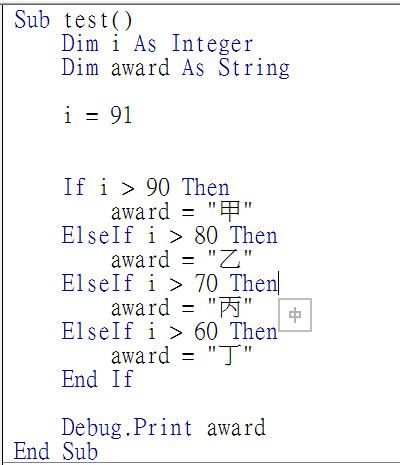 此圖i若變成95,執行時會在即時視窗顯示(1)乙
(2)丙
(3)丁
(4)甲 此圖i若變成95,執行時會在即時視窗顯示(1)乙
(2)丙
(3)丁
(4)甲
| ||
| ( | ) | 19. | 請問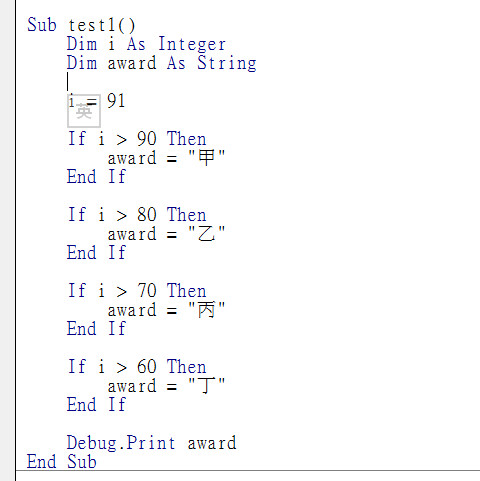 此圖i若變成95,執行時會在即時視窗顯示(1)甲
(2)乙
(3)丙
(4)丁 此圖i若變成95,執行時會在即時視窗顯示(1)甲
(2)乙
(3)丙
(4)丁
| ||
| ( | ) | 20. | 在Excel VBA中大於等於的符號是(1)=> (2)<= (3)<> (4)>= | ||
| ( | ) | 21. | 在Excel VBA的即時視窗輸入 print 1 & 2 + 3 請問會顯示(1)15 (2)123 (3)6 (4)0 | ||
| ( | ) | 22. | 在Excel VBA中不等於的符號是(1)!= (2)<> (3)>=< (4)== | ||
| ( | ) | 23. | 請問此圖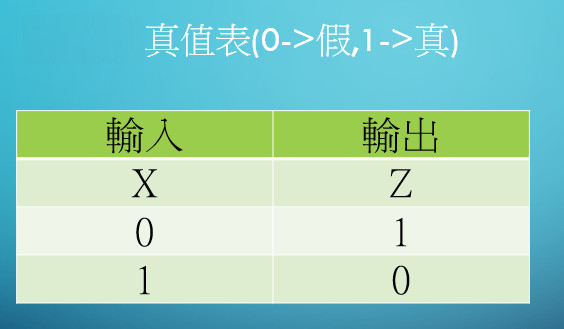 那一個的真值表(1)and
(2)not
(3)xor
(4)or 那一個的真值表(1)and
(2)not
(3)xor
(4)or
| ||
| ( | ) | 24. | 在Excel VBA要強制宣告變數才可以使用,要在程式的最上方加上(1)Option Explicit (2)Option (3)Explicit (4)dim | ||
| ( | ) | 25. | 請問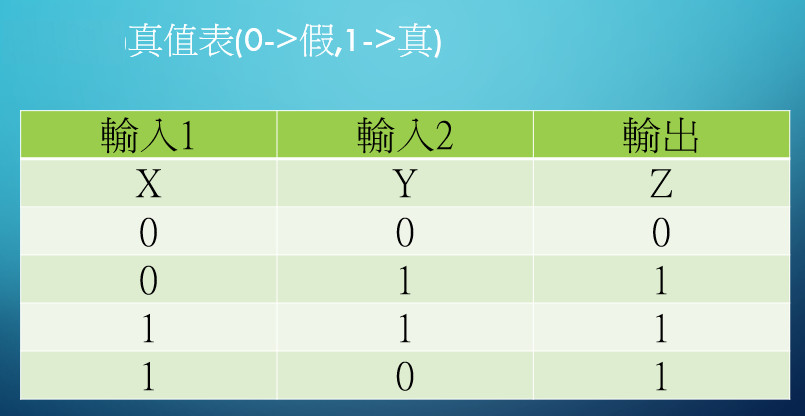 此圖那一個的真值表(1)xor
(2)or
(3)and
(4)not 此圖那一個的真值表(1)xor
(2)or
(3)and
(4)not
| ||
| ( | ) | 26. | 請問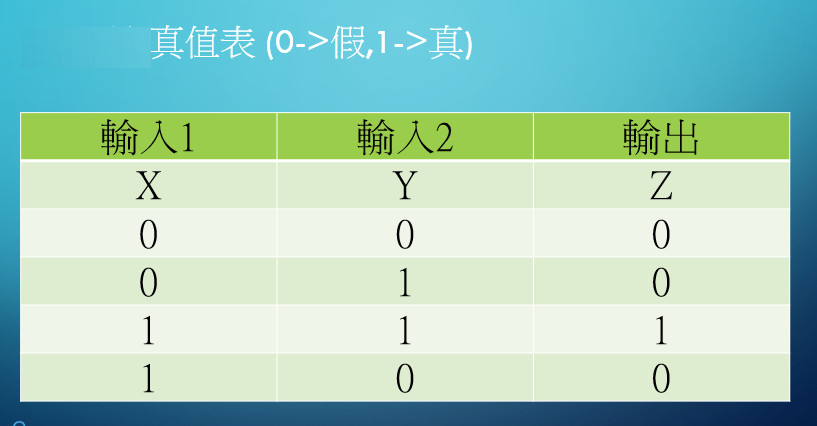 此圖那一個的真值表(1)not
(2)xor
(3)or
(4)and 此圖那一個的真值表(1)not
(2)xor
(3)or
(4)and
| ||
| ( | ) | 27. | 在Excel VBA的即時視窗輸入 print 5\2 請問會顯示(1)0 (2)2.5 (3)2 (4)1 | ||
| ( | ) | 28. | 在ExcelVBA中要使用除(只取整數的商)要用那一個?(1)mod (2)\ (3)/ (4)* | ||
| ( | ) | 29. | 在Excel VBA的即時視窗輸入 print ucase("How are you")請問會顯示(1)how are you (2)How Are You (3)HOW ARE YOU (4)How are you | ||
| ( | ) | 30. | 請問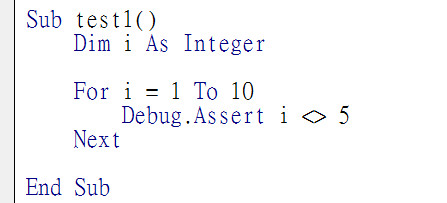 此圖程式執行結果(1)在變數i不等於5時會中斷程式
(2)在變數i=5時會中斷程式
(3)在變數i<5時會中斷程式
(4)在變數i>5時會中斷程式 此圖程式執行結果(1)在變數i不等於5時會中斷程式
(2)在變數i=5時會中斷程式
(3)在變數i<5時會中斷程式
(4)在變數i>5時會中斷程式
|