| ( | ) | 1. | 在Excel VBA的中斷模式時,按那一個按鈕可以逐一行執行(1)shift+F8 (2)Ctrl+Shift+F9 (3)F8 (4)F5 | ||
| ( | ) | 2. | 變數的命名規則(1)第一個字元需英文字母 (2)變數名稱不可包含空白、點、,逗號或其他特殊字元 (3)變數名稱不可為關鍵字,例如for、next、while、public等 (4)以上皆是 | ||
| ( | ) | 3. | 在Excel VBA要強制宣告變數才可以使用,要在程式的最上方加上(1)Option Explicit (2)Option (3)Explicit (4)dim | ||
| ( | ) | 4. | 在Excel VBA中變數的宣告要使用那一個指令(1)let (2)print (3)set (4)dim | ||
| ( | ) | 5. | 為了使亂數每次產生的都不一樣,可以在產生亂數前加入那一個指令(1)int (2)dim (3)rand (4)randomize | ||
| ( | ) | 6. | 在Excel VBA的即時視窗輸入 print lcase("How are you")請問會顯示(1)how are you (2)How Are You (3)HOW ARE YOU (4)How are you | ||
| ( | ) | 7. | 底下程式碼執行結果會在即時視窗出現 Sub test6() Dim i, n As Integer n = 0 For i = 1 To 10 If i Mod 3 = 1 Then n = n + 1 End If If n = 3 Then Exit For End If Next i Debug.Print n & "," & i End Sub(1)3,7 (2)4,11 (3)3,8 (4)4,10 | ||
| ( | ) | 8. | 工作表如圖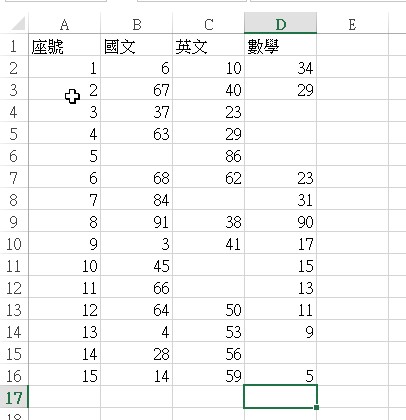 ,若執行底下程式會顯示什麼? ,若執行底下程式會顯示什麼?Sub test10() Dim i As Integer i = 1 Do While Cells(6, i).Value <> "" i = i + 1 Loop MsgBox i End Sub(1)3 (2)4 (3)1 (4)2 | ||
| ( | ) | 9. | 在Excel VBA中要宣告變數I為日期語法為(1)dim I as single (2)dim I as string (3)dim I as date (4)dim I as integer | ||
| ( | ) | 10. | 工作表如圖,若執行底下程式會顯示什麼? Sub test5() Dim i As Integer i = 1 Do While Cells(i + 2, 3).Value <> "" i = i + 1 Loop MsgBox Cells(i + 1, 3).Value End Sub(1)41 (2)86 (3)62 (4)38 | ||
| ( | ) | 11. | 在ExcelVBA中要使用除(只取整數的商)要用那一個?(1)/ (2)* (3)mod (4)\ | ||
| ( | ) | 12. | 底下程式執行時會在即時視窗顯示什麼 Sub test8() Dim i As Integer Dim std_no(5) As Integer For i = 1 To 5 std_no(i - 1) = i * 2 - 1 Next Debug.Print std_no(3) '顯示陣列索引為3的資料 End Sub(1)3 (2)5 (3)7 (4)9 | ||
| ( | ) | 13. | 請問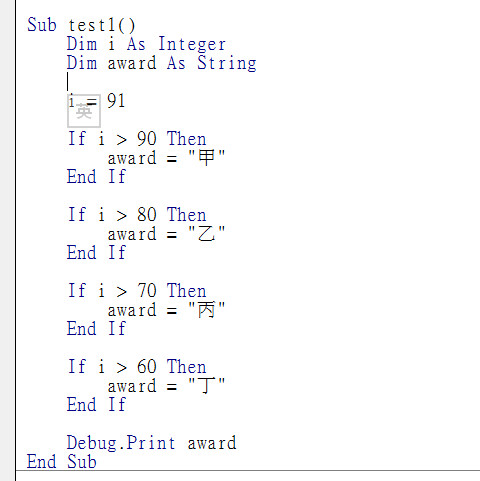 此圖i若變成95,執行時會在即時視窗顯示(1)丙
(2)丁
(3)甲
(4)乙 此圖i若變成95,執行時會在即時視窗顯示(1)丙
(2)丁
(3)甲
(4)乙
| ||
| ( | ) | 14. | 工作表如圖,若執行底下程式會顯示什麼? Sub test2() Dim i As Integer i = 1 Do While Cells(i + 1, 1).Value <> "" i = i + 1 Loop MsgBox i End Sub(1)15 (2)16 (3)17 (4)18 | ||
| ( | ) | 15. | 在Excel VBA中列的英文為(1)row (2)column (3)cell (4)x | ||
| ( | ) | 16. | 工作表如圖,若執行底下程式會顯示什麼? Sub test9() Dim i As Integer i = 1 Do While Cells(1, i).Value <> "" i = i + 1 Loop MsgBox i End Sub(1)3 (2)5 (3)6 (4)4 | ||
| ( | ) | 17. | 在Excel VBA的即時視窗輸入 print 5/2 請問會顯示(1)1 (2)0 (3)2.5 (4)2 | ||
| ( | ) | 18. | Dim StdNo(10) as String這樣的宣告跟底下那一個相同(1)Dim StdNo(0 to 10) as String (2)Dim StdNo(0 to 10) as date (3)Dim StdNo(10) as Integer (4)Dim StdNo(1 to 10) as String | ||
| ( | ) | 19. | 在Excel VBA中小於等於的符號是(1)=< (2)>= (3)=> (4)<= | ||
| ( | ) | 20. | 底下程式碼執行結果會在即時視窗出現 Sub test5() Dim i, n As Integer n = 0 For i = 1 To 10 If i Mod 3 = 1 Then n = n + 1 End If Next i Debug.Print n & "," & i End Sub(1)5,10 (2)4,11 (3)3,10 (4)4,10 | ||
| ( | ) | 21. | 程式碼如下 For i= 1 to 10 cells(i,1).value=i Next i 此程式的執行結果?(1)在儲存格A1:A10填入1到10 (2)在儲存格A1:A10都顯示1 (3)在儲存格A1:J1填入1到10 (4)在儲存格A1:J1填入1到1 | ||
| ( | ) | 22. | inputbox的回傳值型別是(1)date (2)integer (3)string (4)single | ||
| ( | ) | 23. | 請問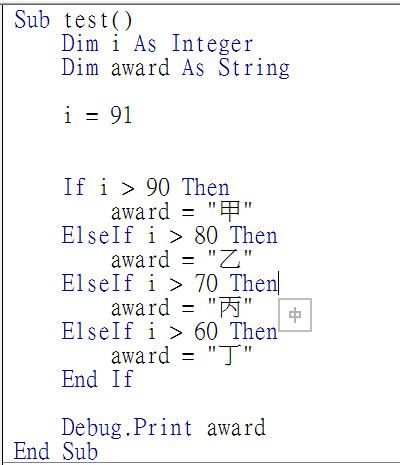 此圖i若變成95,執行時會在即時視窗顯示(1)丁
(2)甲
(3)乙
(4)丙 此圖i若變成95,執行時會在即時視窗顯示(1)丁
(2)甲
(3)乙
(4)丙
| ||
| ( | ) | 24. | 在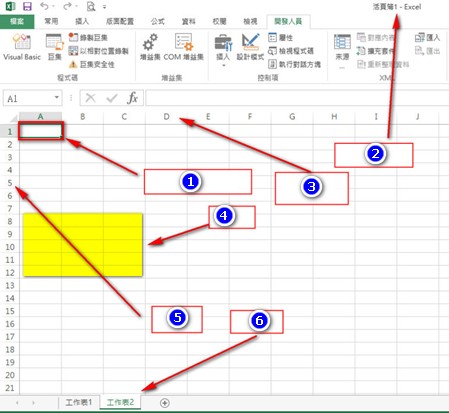 圖中的數字1代表(1)cell
(2)row(列)
(3)column(行)
(4)worksheet 圖中的數字1代表(1)cell
(2)row(列)
(3)column(行)
(4)worksheet
| ||
| ( | ) | 25. | 底下程式碼執行結果會在即時視窗出現 Sub test3() Dim i, n As Integer n = 0 For i = 5 To 1 Step -1 n = n + 1 Next i Debug.Print n & "," & i End Sub(1)5,1 (2)5,-1 (3)0,5 (4)5,0 |